Word Solitaire: Match & Play
- 4.8
- Rating
- 100.00K
- Installs
- Free
- Price
 Analysis by App-foxy
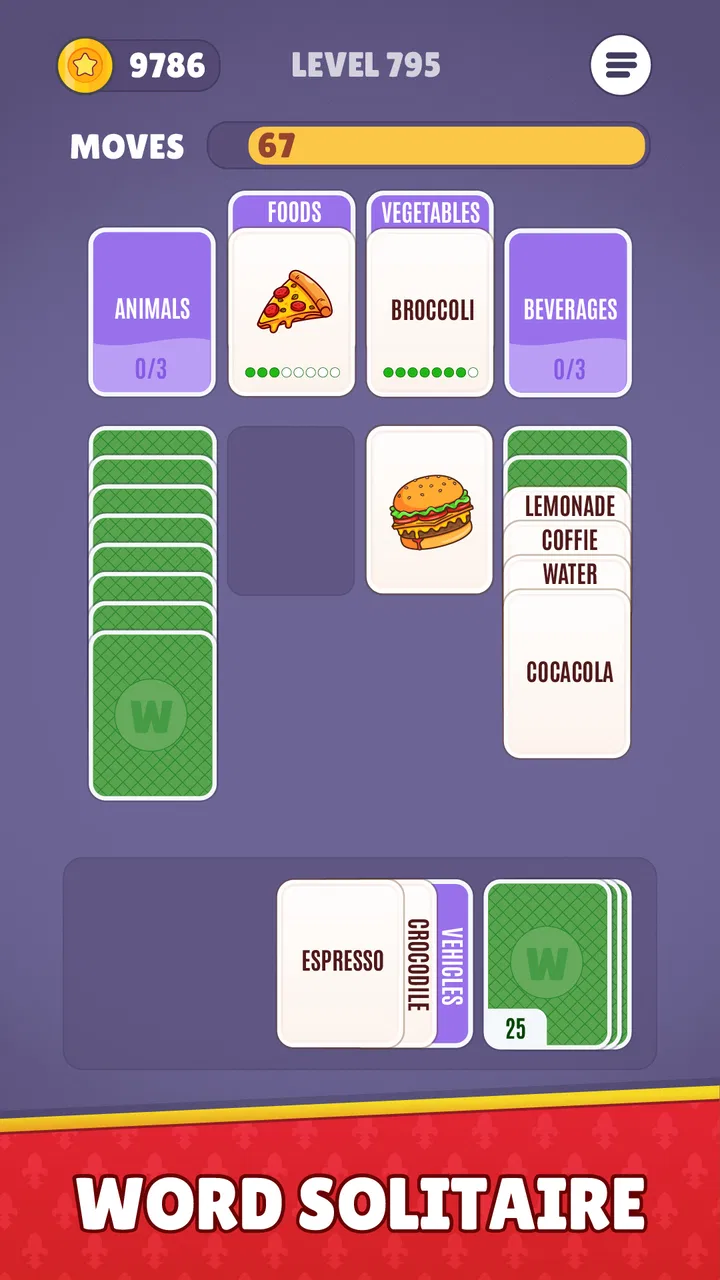
I approached Word Solitaire: Match & Play expecting a light word game, but its solitaire-like structure gives the category a more deliberate rhythm. Instead of simply racing to find words, I sort them into related groups while managing the order in which options become useful. That small change makes each round feel closer to tidying a messy desk than solving a conventional crossword: I can make quick progress, then pause to decide which move will keep the board manageable.
Developed by Unico Studio, this free word game is aimed at people who want a calm puzzle session rather than a noisy arcade challenge. It is rated for Everyone, and the current version is 1.0.12. The game has already reached over 50 thousand installs and holds a 4.8 average from around 1.9 thousand ratings, which matches my impression that its straightforward format is easy to pick up. Still, the relaxed presentation should not be mistaken for a completely effortless experience. The later decisions depend on vocabulary, attention, and patience.
How a normal round feels from the first move
The basic workflow is simple enough to understand without a tutorial-heavy introduction. I look at the available words, identify items that seem to belong together, and place them into matching categories. The solitaire influence comes from the way I work through what is visible and try to expose or use the next useful choices. The pleasure is not just in recognizing a category; it is in recognizing one before a tempting but incorrect grouping causes trouble.
You May Also Like

 Blood Strike: 2.5 Anniversary
Blood Strike’s Loadouts Turn Every Drop Into a Tactical Gamble
A close look at Blood Strike’s custom loadouts: how fast access to signature weapons reshapes its battle royale rhythm, rewards preparation, and narrows the gap between fights.

 Pandora - Music & Podcasts
Pandora’s Music Is Easy to Start, but Harder to Recover
Pandora’s strength is its low-effort path from a seed to a station. Its weak spot is how much confidence it asks you to place in connection, setup, and quiet recovery.

 8 Ball Pool
 Is Built on Rivalries, Rematches, and Routine
A close look at the rivalries, rematches, shared routines, and unanswered safety questions that turn a quick pool match into a persistent mobile community.

 Samsung Music
’s Quiet Strength Is Playing What You Already Own
Its reach comes less from spectacle than from dependable access to a personal library. That simplicity is both the app’s strongest retention engine and its ceiling.

 AccuWeather: Weather Radar
AccuWeather Review: A Quick, Clear Forecast for Everyday Decisions
For everyday plans, the best forecast is the one you can understand quickly. AccuWeather makes rain timing, radar, and local conditions easy to act on, with a few trade-offs.

 Hill Climb Racing
Why Hill Climb Racing Still Turns Crashes Into One More Run
A tiny car, a bumpy hill and one more upgrade: Hill Climb Racing keeps resurfacing because its simple chaos makes every near-miss feel personal.
More From Our News Desk



That makes the opening of a round important. I do not immediately commit to the first three or four words that appear related. I scan the whole available set and look for words with unusually specific connections. A word that could fit several themes is often more valuable as a later anchor, while a highly distinctive word can reveal the intended category early. This habit is one of the first practical improvements I noticed: the game rewards a short inspection phase before tapping.
For a quick everyday session, the format works well. I can play while waiting for an appointment, during a short break, or when I want something more mentally engaging than scrolling. A typical session does not require me to learn a complicated control system, and the word-based format means I can focus on the puzzle rather than reflexes. If I am tired, I can still make progress by sorting obvious matches. If I am alert, I can spend longer examining the ambiguous words.
The solitaire-style design also gives mistakes a different feel from mistakes in a timed word search. I am not simply trying to type as many answers as possible before the clock runs out. The pressure comes from using the available arrangement intelligently. That is a better fit for me when I want a game that lets me think, although anyone looking for rapid competitive play may find the pace too restrained.
The most useful baseline habit is to separate recognition from commitment. I mentally mark possible relationships, but I only make a selection when the group has a clear shared idea. This prevents a common error: choosing words because they are vaguely associated rather than because they form the strongest category. In practice, that distinction matters more than trying to move quickly.
Settings and play habits worth checking
I recommend spending a moment looking through the available in-game settings before settling into regular play. I do not treat the settings screen as a formality, because small presentation choices can affect how comfortably I read and sort words. The most valuable adjustment is whichever option makes the board easiest for me to inspect without distraction. On a smaller phone, clear text and comfortable spacing matter more than squeezing every option onto the screen.
Settings are also worth revisiting after a few sessions. My needs change depending on where I am playing. In a quiet room, I may prefer a minimal presentation that keeps my attention on the words. In a public place, I may want a less distracting experience and rely more heavily on visual feedback. I would not assume that the default arrangement is ideal simply because it is the first one shown.
Another useful habit is to treat each round as a repeatable process rather than an isolated guess. I first scan for obvious categories, then examine words that have multiple possible meanings, and finally check whether the remaining group has a coherent connection. This three-pass approach is more reliable than tapping as soon as something looks familiar. It also makes it easier to understand why a move failed, because I can identify whether I overlooked a stronger category or committed too early.
The free price makes experimenting with that workflow easy, although in-app purchases range from $1.99 to $79.99 per item. I would recommend playing long enough to decide whether the core sorting loop suits you before spending anything. A purchase can make sense for someone who plays regularly and wants whatever optional extras are offered, but the central question is whether the basic puzzle format keeps your attention. No payment can fix a mismatch between your preferred pace and the game’s thoughtful structure.
One practical point for families is the Everyone age rating. The word-based format is approachable, and I can imagine it working as a casual shared puzzle, especially when one person explains why a group belongs together. However, younger players may still encounter vocabulary that is unfamiliar, while adults may find some rounds too easy if they already know the category immediately. The age rating describes suitability, not a guarantee that every puzzle will match every player’s reading level.
Patterns that help me solve groups faster
My fastest improvement came from looking for category boundaries instead of only looking for category members. When two words seem to belong together, I ask what kind of category they suggest and whether the other possible members share the same level of specificity. For example, a broad association is weaker than a group based on a precise relationship. This keeps me from building a category around a loose theme that later turns out to be a distraction.
I also keep an eye on words that can act as bridges. A bridge word appears to fit more than one possible group, so it can make two categories look equally convincing. I avoid using it until I have tested the less ambiguous words. This is a small but non-obvious trade-off: the most familiar word is not always the best first move. Sometimes the safest move is the one that removes a word with only one plausible home.
Another pattern is to use elimination actively. After identifying one likely group, I do not stop thinking about the remaining words. I check whether removing that group creates a cleaner second category or whether it leaves several unrelated words behind. If the leftovers look chaotic, I reconsider before committing. This is particularly useful when a group is technically connected but not as strong as another possible interpretation.
I find it helpful to read every word in the group together before confirming it. Individually, each item may seem convincing. As a set, the relationship can feel uneven. Reading them side by side exposes that weakness and reduces impulsive selections. It is a simple routine, but it turns the game from a guessing exercise into a small verification process.
For players who want a more efficient session, I suggest alternating speed and accuracy goals. On one round, I focus on careful category discovery and accept a slower pace. On the next, I try to solve obvious groups quickly while preserving the same inspection discipline. This reveals whether speed is genuinely improving or whether I am merely making more speculative moves. The game is better suited to this self-paced practice than to a conventional timed word challenge.
The strongest everyday use case is a short mental reset. If I have ten minutes between tasks, I can play one or two rounds and leave with the feeling that I used my attention constructively. It is also suitable for people who enjoy language but do not want to write long answers or memorize a large rule set. On the other hand, it is not my first choice for a group party, a competitive leaderboard-focused session, or a game night where everyone wants immediate excitement.
Where the deeper challenge begins
The game’s difficulty is tied to interpretation rather than complicated controls. That is a strength when I want a clean interface, but it also creates a limit: players who prefer visibly escalating mechanics may eventually want more variety than category sorting provides. The core loop can remain satisfying for a long time if I enjoy word relationships, yet its appeal depends heavily on whether I like revisiting the same kind of mental task.
I also notice a tension between calm design and occasional frustration. A relaxed presentation encourages me to think carefully, but an ambiguous group can still feel stubborn when several answers seem defensible. In those moments, I do better by stepping away for a minute rather than repeatedly tapping the same combination. The game benefits from patience, and forcing a solution usually makes the experience less enjoyable.
Vocabulary is another meaningful boundary. A strong English reader may find some categories immediately, while someone learning the language may need more time to recognize a word’s secondary meaning or cultural association. That does not make the game unsuitable for learners, but it changes the experience. I would use it as a vocabulary discussion tool with another person, not as a guaranteed beginner language course.
The current release is version 1.0.12, so I see it as a relatively early version of the product rather than a mature platform with years of accumulated systems. That is not a criticism of the individual rounds. It simply affects what I expect from the overall package. I judge it primarily on the quality of its sorting loop, not on a promise of endless modes or a large competitive ecosystem.
There is also a practical financial consideration. The game costs nothing to start, but the listed optional purchases extend from $1.99 to $79.99 per item. That wide range means I would pay attention during the first few sessions to how often the game presents purchase prompts and whether optional items affect my preferred rhythm. Players who want a completely uninterrupted free experience should make that decision early and avoid treating every optional offer as part of the basic game.
Compared with a crossword, this game asks for less long-form clue solving and more rapid grouping. Compared with a word search, it offers more interpretation and less visual scanning. Compared with an anagram game, it focuses less on constructing words and more on understanding relationships among words that are already visible. Those distinctions make it a good middle ground for someone who likes language puzzles but wants shorter, more self-contained decisions.
It is less suitable for someone who wants a large board to explore, a story campaign, or a highly social competitive format. A traditional crossword may be the better alternative when I want layered clues and a longer solving arc. A fast anagram game is better when I want immediate action. This title earns its place by offering a quieter sorting challenge, not by replacing every other word-game style.
What experienced play can and cannot improve
With practice, I become better at spotting likely categories, reserving bridge words, and checking leftovers. Those skills make the game feel more controlled, but they do not remove uncertainty entirely. Some rounds will still depend on knowing a particular word or seeing an association that does not come naturally to me. That is a healthy limit for a puzzle game: experience improves judgment, but it does not turn every board into an automatic sequence.
I recommend keeping a mental note of recurring personal mistakes. Mine tend to fall into two groups: accepting broad associations too quickly and overlooking a word’s less obvious meaning. Once I recognize that pattern, I can slow down specifically at those moments instead of playing every round cautiously. This makes the game feel more efficient without turning it into a mechanical routine.
Another advanced habit is to compare the strength of categories, not just their existence. Two groups may both be possible, but one may have a tighter shared definition. I choose the tighter group first because it reduces ambiguity for the remaining words. This is especially useful when I am tempted by a visually neat arrangement that lacks a precise connection.
I would also avoid judging my ability solely by how quickly I finish. A fast solution based on obvious groups does not necessarily show better reasoning than a slower solution on a more ambiguous board. I get more value by asking whether I made deliberate choices and whether I learned something about the game’s category logic. That mindset keeps the relaxing tone intact while still giving experienced players a way to improve.
For someone deciding whether to install it, the key question is simple: do you enjoy sorting ideas as much as finding words? If yes, this is an approachable free game with enough ambiguity to reward careful habits. If you mainly want vocabulary expansion, deep clue construction, or fast competitive pressure, another word-game format may suit you better. The Everyone rating makes it broadly accessible, but personal taste still matters more than accessibility.
My final view after settling into the routine
Word Solitaire: Match & Play works best when I treat it as a quiet thinking game rather than a test of speed. Its strongest quality is the way familiar word knowledge becomes a sequence of decisions: inspect, group, verify, and adapt. The solitaire influence gives the activity a satisfying sense of order, while the category structure keeps it more thoughtful than a basic word hunt.
I appreciate that I can use it in small pockets of time without learning elaborate controls. I also like that improvement comes from practical habits—waiting on ambiguous words, comparing category strength, and checking the remaining board—rather than from memorizing a complicated system. Those details give the game more depth than its short store summary suggests.
The limitations are clear as well. The pace will not satisfy players who need constant action, and the central format may feel repetitive to anyone who wants several different puzzle types. The optional purchase range, from $1.99 to $79.99 per item, is another reason I would begin cautiously and decide based on actual play rather than impulse. I would also expect vocabulary familiarity to influence difficulty significantly.
Overall, I recommend it to casual word-game fans, puzzle players who enjoy careful grouping, and anyone looking for a low-pressure mental break. I would skip it if my priority were competitive speed, elaborate progression, or a crossword-style solving experience. For the right player, though, the simple loop has a pleasant discipline: each round asks me to look closely, resist the first assumption, and make the board a little clearer one group at a time.
FAQs for Word Solitaire: Match & Play
01What is Word Solitaire: Match & Play?
Word Solitaire: Match & Play is a unique blend of word puzzle games and classic solitaire mechanics. Players create words using letter cards to clear the board, combining the strategy of solitaire with the challenge of word games. It's designed for both casual players and word game enthusiasts.
02Is Word Solitaire: Match & Play free to play?
Yes, Word Solitaire: Match & Play is free to download and play, but it offers optional in-app purchases. These purchases can enhance the gaming experience, providing additional features or power-ups. However, players can enjoy the full game experience without spending money.
03What platforms is Word Solitaire: Match & Play available on?
Word Solitaire: Match & Play is available on both Android and iOS devices. Users can download it from the Google Play Store for Android devices and the Apple App Store for iOS devices. Ensure your device meets the minimum system requirements for a smooth gaming experience.
04Does Word Solitaire: Match & Play require an internet connection?
Word Solitaire: Match & Play can be played offline, making it ideal for users who want to enjoy the game without needing a constant internet connection. However, certain features, like syncing progress across devices or accessing online leaderboards, may require internet access.
05How does Word Solitaire: Match & Play handle data privacy?
Word Solitaire: Match & Play takes user privacy seriously, adhering to standard data protection practices. The app may collect data to enhance user experience, such as game progress and in-app purchases, but it does not share personal information without consent. Always review the privacy policy for detailed information.
Pros
- Engaging mix of solitaire and word puzzles.
- Visually appealing with smooth animations.
- Increases vocabulary and cognitive skills.
- Daily challenges keep gameplay fresh.
- Offline mode available for play anywhere.
Cons
- Ads can be intrusive during gameplay.
- Some levels may feel repetitive over time.
- In-app purchases can be pricey.
- Limited hints without spending money.
- Occasional crashes on older devices.

Word Solitaire: Match & Play
Gallery